

Stop Retyping the Same AI Prompts.
Your prompt library in your Mac menu bar. One shortcut to paste into ChatGPT, Claude, or any app.
macOS 13+ • Free forever • Ready in 30 seconds


Why finding AI prompts is still frustrating
Managing your best prompts across daily work shouldn't be messy:
-
Buried in notes and tabs Stop digging through Apple Notes, Google Docs, and old browser tabs.
-
Window-switching breaks your flow No more constant copying, tab-hopping, and losing focus mid-task.
-
Inconsistent AI results Retyping instructions from scratch produces vague, low-quality answers.

A simpler, faster way to work with AI every day
Built for writers
Access your prompt library from any app with a single keypress. Fast, seamless, and always ready.

Works with every AI tool
Paste instantly into ChatGPT, Claude, Gemini, or any Mac app.

One-click AI Polish
Turn rough notes into structured prompts that get better answers.

Lightweight and fast
Native Mac app. Opens instantly in your menu bar with zero lag.

One quick Mac shortcut
Press ⌘⇧O anywhere to summon your library without switching windows.

Automatic cloud backup
Your prompts stay safely synced across all your Macs.

Fill-in-the-blank templates
Create dynamic templates with placeholders you fill before pasting.
Keep all your prompts in one place
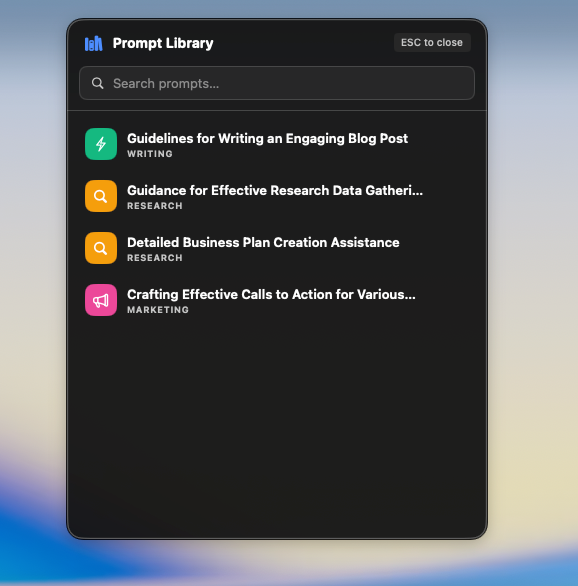
PromptMan saves and organizes your templates so they never get lost. No more searching through old chats or notes. Find and copy what you need in seconds.
Your prompt collection, organized in one place
Turn your best instructions into reusable templates with fill-in-the-blank placeholders. Instant search, zero clutter.

Better AI answers on the very first try
Click AI Polish to instantly clarify rough thoughts into structured instructions that get accurate responses from ChatGPT, Claude, and Gemini.
Loved by people who use AI daily
See how fast professionals move with PromptMan.
"Saves me 30 minutes every single day. My best prompts are always one keypress away."
"I grab my best client templates in three seconds without losing my train of thought. Pure muscle memory."
"AI Polish pays for itself every day. Quick notes turn into structured prompts with ten times better results."
Simple pricing, no surprises
What’s included
- Saved prompts
- AI Prompt Polishes
- Automatic cloud backup
- Instant shortcut access
- Fill-in-the-blank templates
Free
$0 / month
Free forever to start
-
10
-
10 / month
-

-
-

-
Unlimited
-
300 / month
-
-
-
Annual
$22.99 / year
$1.92/mo billed annually
-
Unlimited
-
300 / month
-
-
-
Stop searching. Stop retyping.
Download PromptMan for Mac and paste your best prompts in seconds.
macOS 13+ • Free forever • Ready in 30 seconds
Frequently asked questions
Quick answers to common questions about PromptMan.
Which AI tools does PromptMan work with?
PromptMan works with all AI tools including ChatGPT, Claude, Google Gemini, and Perplexity. It copies text directly to your clipboard so you can also paste into Word, Slack, or any Mac app.
How do I summon PromptMan while working?
Press your global shortcut (default ⌘⇧O) anywhere on macOS to open your prompt drawer instantly over your active window without switching apps.
Is my prompt data private and secure?
Yes. Your prompts are stored locally on your Mac with secure cloud backup. Your personal prompt library is never used to train AI models.
Can I use PromptMan for free?
Yes. The Free plan lets you store up to 10 prompts forever with full global shortcut access at zero cost.